---
title: Full-Stack Web App
description: Build a full-stack device dashboard with a React/Vite frontend and Hummingbird backend on WendyOS
language: swift
---
## Building a Full-Stack Device Dashboard
**Source Code**: The complete source code for this example is available at [github.com/wendylabsinc/samples/swift/web-app](https://github.com/wendylabsinc/samples/tree/main/swift/web-app)
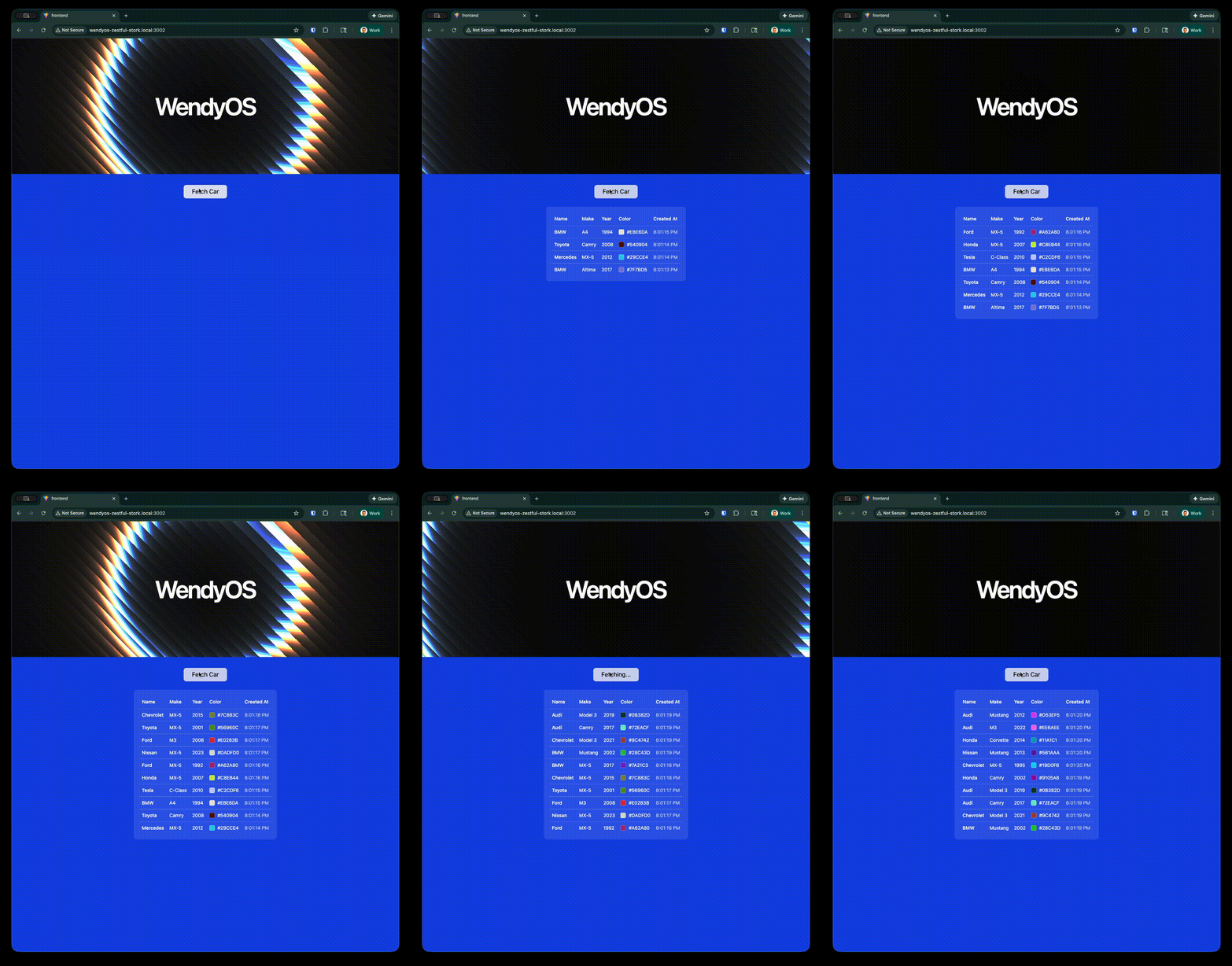 The `fullstack` template generates a complete **device dashboard**: a modern React frontend bundled inside a [Hummingbird](https://hummingbird.codes/) backend that exposes your device's hardware over HTTP and WebSockets. Out of the box it gives you live camera and microphone streams, GPU and system info, and a small SQLite-backed CRUD example — all served from a single container.
This demonstrates how to:
- Serve a production-built React single-page app (SPA) from a Swift backend
- Expose device hardware (camera, audio, GPU, system) through `/api/*` routes
- Persist data on the device with SQLite and a `persist` entitlement
- Deploy the entire stack as a single container to your WendyOS device
### Prerequisites
- Wendy CLI installed on your development machine
- Node.js 22+ and npm installed (only needed if you want to run the frontend dev server locally; the Docker build handles it otherwise)
- Swift 6.2 or later installed **via [swiftly](https://www.swift.org/install/)** (Xcode's Swift is not supported)
- A WendyOS device plugged in over USB or connectable over Wi-Fi
## Project Structure
The template ships a complete frontend under `frontend/` and a Swift backend at the project root. The frontend is built to static assets and copied into the backend image as `./static`:
```
web-app/
├── Package.swift
├── Dockerfile
├── wendy.json
├── .swift-version
├── Sources/
│ └── web-app/
│ ├── App.swift # Router, /api routes, WebSockets, static serving
│ ├── CarStore.swift # SQLite-backed cars CRUD (GRDB)
│ ├── MJPEGCamera.swift # GStreamer/V4L2 camera capture
│ ├── AudioCapture.swift # Microphone capture
│ ├── GPUInfo.swift # GPU info
│ ├── SystemInfo.swift # Host/CPU/mem/disk/uptime
│ ├── DeviceDiscovery.swift # Camera/ALSA device enumeration
│ └── StaticFileMiddleware.swift
└── frontend/ # React 19 + Vite + Tailwind v4 + shadcn/ui
├── package.json
├── vite.config.ts
├── index.html
└── src/
├── App.tsx # Sidebar dashboard + react-router routes
├── main.tsx
├── components/ # app-sidebar, ui/ (shadcn), ...
└── pages/
├── camera.tsx
├── audio.tsx
├── persistence.tsx
├── gpu.tsx
└── system.tsx
```
The generated project contains many more frontend files (the full shadcn/ui component library lives under `frontend/src/components/ui/`). The tree above shows the meaningful structure — you don't build any of it by hand; the template ships the whole thing.
## Setting Up Your Project
### Initialize the Project
Start from the Wendy full-stack Swift template:
```bash
wendy init web-app --target wendyos --language swift --template fullstack --var APP_ID=web-app --var PORT=8000 --var SWIFT_VERSION=6.3 --assistant skip --git-init no
cd web-app
```
The template creates `wendy.json`, the Dockerfile, the entire React frontend, and the Swift backend. The sections below explain how the generated full-stack app fits together.
### Run on WendyOS
```bash
wendy run
```
Wendy will build the frontend, build and cross-compile the Swift backend, deploy the container, and stream the run output. Once the readiness probe passes, the `postStart` hook opens the dashboard in your browser.
## Code Breakdown
### Generated Frontend
The frontend is a React 19 SPA built with Vite, Tailwind CSS v4, and shadcn/ui. It uses `react-router-dom` v7 for client-side routing and renders a sidebar dashboard. The default route redirects to `/camera`:
```tsx
import { BrowserRouter, Routes, Route, Navigate } from "react-router-dom"
import { AppSidebar } from "@/components/app-sidebar"
import { SiteHeader } from "@/components/site-header"
import { SidebarInset, SidebarProvider } from "@/components/ui/sidebar"
import CameraPage from "@/pages/camera"
import AudioPage from "@/pages/audio"
import PersistencePage from "@/pages/persistence"
import GpuPage from "@/pages/gpu"
import SystemPage from "@/pages/system"
export default function App() {
return (
} />
} />
} />
} />
} />
} />
)
}
```
Each page talks to the backend's `/api/*` routes (and the camera/audio WebSocket streams). The frontend's `package.json` pins React 19, `react-router-dom` v7, Tailwind v4, and the shadcn/ui dependency set; `npm run build` runs `tsc -b && vite build` to produce the static `dist/` output.
You don't scaffold the frontend manually. The template already includes the full Vite + React + shadcn/ui project. The Docker build runs `npm install` and `npm run build` for you.
### Generated Backend Package
The generated `Package.swift` pulls in Hummingbird (with WebSockets), GRDB for SQLite persistence, and the GStreamer Swift wrapper (Linux only) for camera/audio capture:
```swift
// swift-tools-version: 6.2
import PackageDescription
let package = Package(
name: "web-app",
platforms: [
.macOS(.v14),
],
dependencies: [
.package(url: "https://github.com/hummingbird-project/hummingbird.git", from: "2.21.1", traits: []),
.package(url: "https://github.com/hummingbird-project/hummingbird-websocket.git", from: "2.0.0"),
.package(url: "https://github.com/groue/GRDB.swift.git", from: "7.0.0"),
.package(url: "https://github.com/wendylabsinc/gstreamer-swift.git", branch: "main"),
.package(url: "https://github.com/apple/swift-container-plugin.git", from: "1.0.0"),
],
targets: [
.executableTarget(
name: "web-app",
dependencies: [
.product(name: "Hummingbird", package: "hummingbird"),
.product(name: "HummingbirdWebSocket", package: "hummingbird-websocket"),
.product(name: "GRDB", package: "GRDB.swift"),
.product(name: "GStreamer", package: "gstreamer-swift", condition: .when(platforms: [.linux])),
]
),
]
)
```
The build runs against Swift 6.3 (the Dockerfile uses `swift:6.3-bookworm`). The `swift-tools-version` line declares the minimum Package Manager version and is independent of the toolchain that compiles the code.
### Generated Backend Routes
`Sources/web-app/App.swift` builds the Hummingbird server on port `8000`. It opens a SQLite database at `/data/cars.db`, wires up the device endpoints, and serves the built SPA from `./static`, falling back to `index.html` for client-side routing:
```swift
let carStore = try CarStore(path: "/data/cars.db")
let camera = MJPEGCamera(device: "/dev/video0")
let audio = AudioCapture()
let staticDir = "./static"
let router = Router()
router.get("/health") { _, _ -> HTTPResponse.Status in .ok }
// Cars CRUD, backed by SQLite at /data/cars.db
let carsGroup = router.group("api/cars")
carsGroup.get { _, _ in try jsonResponse(await carStore.all(), status: .ok) }
carsGroup.post { request, context in /* create */ }
carsGroup.get(":id") { _, context in /* read */ }
carsGroup.put(":id") { request, context in /* update */ }
carsGroup.delete(":id") { _, context in /* delete */ }
// Device endpoints
router.get("api/cameras") { _, _ in try jsonResponse(listCameras(), status: .ok) }
router.get("api/microphones") { _, _ in try jsonResponse(listAlsaDevices(args: ["arecord", "-l"]), status: .ok) }
router.get("api/speakers") { _, _ in try jsonResponse(listAlsaDevices(args: ["aplay", "-l"]), status: .ok) }
router.get("api/gpu") { _, _ in try jsonResponse(gpuInfo(), status: .ok) }
router.get("api/system") { _, _ in try jsonResponse(systemInfo(), status: .ok) }
// Serve the SPA and fall back to index.html
router.get("/", use: spaHandler(staticDir: staticDir))
router.get("assets/{path+}", use: spaHandler(staticDir: staticDir))
router.get("{path+}", use: spaHandler(staticDir: staticDir))
```
Live media is delivered over WebSockets on a separate router:
```swift
let wsRouter = Router(context: BasicWebSocketRequestContext.self)
wsRouter.ws("api/camera/stream") { inbound, outbound, _ in /* MJPEG frames */ }
wsRouter.ws("api/audio/stream") { inbound, outbound, _ in /* PCM frames */ }
let app = Application(
router: router,
server: .http1WebSocketUpgrade(webSocketRouter: wsRouter),
configuration: .init(address: .hostname("0.0.0.0", port: 8000))
)
```
The camera stream accepts `{"switch_camera": ""}` and the audio stream accepts `{"switch_microphone": ""}` to change the active source.
### Generated Dockerfile
The Dockerfile is a three-stage build: build the frontend with Node, build the Swift backend with `swift:6.3-bookworm` (plus GStreamer and SQLite dev libraries), and run on `swift:6.3-bookworm-slim` with the GStreamer/ALSA/V4L runtime plugins and SQLite. The built frontend is copied in as `./static`:
```dockerfile
# Stage 1: Build the frontend
FROM node:22-slim AS frontend
WORKDIR /frontend
COPY frontend/package*.json ./
RUN npm install
COPY frontend/ .
RUN npm run build
# Stage 2: Build the Swift backend
FROM swift:6.3-bookworm AS builder
RUN apt-get update && apt-get install -y --no-install-recommends \
libgstreamer1.0-dev \
libgstreamer-plugins-base1.0-dev \
libgstreamer-plugins-bad1.0-dev \
libsqlite3-dev \
&& rm -rf /var/lib/apt/lists/*
WORKDIR /app
COPY Package.swift ./
COPY Sources Sources
RUN swift build -c release
# Stage 3: Runtime image
FROM swift:6.3-bookworm-slim
RUN apt-get update && apt-get install -y --no-install-recommends \
gstreamer1.0-tools \
gstreamer1.0-plugins-base \
gstreamer1.0-plugins-good \
gstreamer1.0-plugins-bad \
gstreamer1.0-plugins-ugly \
gstreamer1.0-libav \
gstreamer1.0-alsa \
alsa-utils \
v4l-utils \
sqlite3 \
ca-certificates \
&& rm -rf /var/lib/apt/lists/*
COPY --from=builder /app/.build/release/web-app /usr/local/bin/web-app
COPY --from=frontend /frontend/dist ./static
EXPOSE 8000
CMD ["web-app"]
```
### Generated wendy.json
Because the dashboard touches the camera, microphone, GPU, and persistent storage, the generated `wendy.json` requests host networking plus the `camera`, `audio`, `gpu`, and `persist` entitlements. The `persist` volume `web-app-data` is mounted at `/data`, where the SQLite database lives:
```json
{
"appId": "web-app",
"platform": "linux",
"version": "0.1.0",
"entitlements": [
{
"type": "network",
"mode": "host"
},
{
"type": "camera"
},
{
"type": "audio"
},
{
"type": "gpu"
},
{
"type": "persist",
"name": "web-app-data",
"path": "/data"
}
],
"readiness": {
"tcpSocket": { "port": 8000 },
"timeoutSeconds": 30
},
"hooks": {
"postStart": {
"cli": "wendy utils open-browser http://${WENDY_HOSTNAME}:8000"
}
}
}
```
The `readiness` probe waits until port `8000` is accepting connections before proceeding. The `postStart` hook automatically opens your browser once the app is ready.
## Run Again on WendyOS
Deploy your full-stack dashboard to your WendyOS device:
```bash
wendy run
```
## Test Your Web App
Your browser will open automatically once the app is ready, thanks to the `postStart` hook. If it doesn't, navigate to:
```
http://wendyos-true-probe.local:8000
```
**Replace the hostname**: Each WendyOS device has a unique hostname. Replace `wendyos-true-probe` with your device's actual hostname shown in the CLI output.
## Test the API Directly
```bash
# System info (host, CPU, memory, disk, uptime)
curl http://wendyos-true-probe.local:8000/api/system
# List cars (SQLite-backed CRUD)
curl http://wendyos-true-probe.local:8000/api/cars
# Create a car
curl -X POST http://wendyos-true-probe.local:8000/api/cars \
-H "Content-Type: application/json" \
-d '{"make":"Tesla","model":"Model 3","color":"#cc0000","year":2024}'
```
## Learn More
- [Hummingbird Documentation](https://docs.hummingbird.codes/)
- [Vite Documentation](https://vitejs.dev/)
- [shadcn/ui Components](https://ui.shadcn.com/)
## Next Steps
Now that you have a full-stack device dashboard running:
- Add new `/api/*` routes and a matching page in `frontend/src/pages/`
- Extend the cars example into your own SQLite-backed data model
- Stream additional device data over WebSockets
- Add authentication middleware
- Customize the shadcn/ui theme and sidebar navigation
### Run the frontend dev server
For fast UI iteration, run Vite's dev server:
```bash
cd frontend
npm install
npm run dev
```
### Build and Run with Docker
To run the whole stack the same way it runs on a device:
```bash
docker build -t swift-web-app .
docker run -p 8000:8000 -v "$PWD/data:/data" swift-web-app
```
Then open `http://localhost:8000` in your browser. Note that camera, audio, and GPU endpoints depend on hardware that may not be available on your development machine.
The `fullstack` template generates a complete **device dashboard**: a modern React frontend bundled inside a [Hummingbird](https://hummingbird.codes/) backend that exposes your device's hardware over HTTP and WebSockets. Out of the box it gives you live camera and microphone streams, GPU and system info, and a small SQLite-backed CRUD example — all served from a single container.
This demonstrates how to:
- Serve a production-built React single-page app (SPA) from a Swift backend
- Expose device hardware (camera, audio, GPU, system) through `/api/*` routes
- Persist data on the device with SQLite and a `persist` entitlement
- Deploy the entire stack as a single container to your WendyOS device
### Prerequisites
- Wendy CLI installed on your development machine
- Node.js 22+ and npm installed (only needed if you want to run the frontend dev server locally; the Docker build handles it otherwise)
- Swift 6.2 or later installed **via [swiftly](https://www.swift.org/install/)** (Xcode's Swift is not supported)
- A WendyOS device plugged in over USB or connectable over Wi-Fi
## Project Structure
The template ships a complete frontend under `frontend/` and a Swift backend at the project root. The frontend is built to static assets and copied into the backend image as `./static`:
```
web-app/
├── Package.swift
├── Dockerfile
├── wendy.json
├── .swift-version
├── Sources/
│ └── web-app/
│ ├── App.swift # Router, /api routes, WebSockets, static serving
│ ├── CarStore.swift # SQLite-backed cars CRUD (GRDB)
│ ├── MJPEGCamera.swift # GStreamer/V4L2 camera capture
│ ├── AudioCapture.swift # Microphone capture
│ ├── GPUInfo.swift # GPU info
│ ├── SystemInfo.swift # Host/CPU/mem/disk/uptime
│ ├── DeviceDiscovery.swift # Camera/ALSA device enumeration
│ └── StaticFileMiddleware.swift
└── frontend/ # React 19 + Vite + Tailwind v4 + shadcn/ui
├── package.json
├── vite.config.ts
├── index.html
└── src/
├── App.tsx # Sidebar dashboard + react-router routes
├── main.tsx
├── components/ # app-sidebar, ui/ (shadcn), ...
└── pages/
├── camera.tsx
├── audio.tsx
├── persistence.tsx
├── gpu.tsx
└── system.tsx
```
The generated project contains many more frontend files (the full shadcn/ui component library lives under `frontend/src/components/ui/`). The tree above shows the meaningful structure — you don't build any of it by hand; the template ships the whole thing.
## Setting Up Your Project
### Initialize the Project
Start from the Wendy full-stack Swift template:
```bash
wendy init web-app --target wendyos --language swift --template fullstack --var APP_ID=web-app --var PORT=8000 --var SWIFT_VERSION=6.3 --assistant skip --git-init no
cd web-app
```
The template creates `wendy.json`, the Dockerfile, the entire React frontend, and the Swift backend. The sections below explain how the generated full-stack app fits together.
### Run on WendyOS
```bash
wendy run
```
Wendy will build the frontend, build and cross-compile the Swift backend, deploy the container, and stream the run output. Once the readiness probe passes, the `postStart` hook opens the dashboard in your browser.
## Code Breakdown
### Generated Frontend
The frontend is a React 19 SPA built with Vite, Tailwind CSS v4, and shadcn/ui. It uses `react-router-dom` v7 for client-side routing and renders a sidebar dashboard. The default route redirects to `/camera`:
```tsx
import { BrowserRouter, Routes, Route, Navigate } from "react-router-dom"
import { AppSidebar } from "@/components/app-sidebar"
import { SiteHeader } from "@/components/site-header"
import { SidebarInset, SidebarProvider } from "@/components/ui/sidebar"
import CameraPage from "@/pages/camera"
import AudioPage from "@/pages/audio"
import PersistencePage from "@/pages/persistence"
import GpuPage from "@/pages/gpu"
import SystemPage from "@/pages/system"
export default function App() {
return (
} />
} />
} />
} />
} />
} />
)
}
```
Each page talks to the backend's `/api/*` routes (and the camera/audio WebSocket streams). The frontend's `package.json` pins React 19, `react-router-dom` v7, Tailwind v4, and the shadcn/ui dependency set; `npm run build` runs `tsc -b && vite build` to produce the static `dist/` output.
You don't scaffold the frontend manually. The template already includes the full Vite + React + shadcn/ui project. The Docker build runs `npm install` and `npm run build` for you.
### Generated Backend Package
The generated `Package.swift` pulls in Hummingbird (with WebSockets), GRDB for SQLite persistence, and the GStreamer Swift wrapper (Linux only) for camera/audio capture:
```swift
// swift-tools-version: 6.2
import PackageDescription
let package = Package(
name: "web-app",
platforms: [
.macOS(.v14),
],
dependencies: [
.package(url: "https://github.com/hummingbird-project/hummingbird.git", from: "2.21.1", traits: []),
.package(url: "https://github.com/hummingbird-project/hummingbird-websocket.git", from: "2.0.0"),
.package(url: "https://github.com/groue/GRDB.swift.git", from: "7.0.0"),
.package(url: "https://github.com/wendylabsinc/gstreamer-swift.git", branch: "main"),
.package(url: "https://github.com/apple/swift-container-plugin.git", from: "1.0.0"),
],
targets: [
.executableTarget(
name: "web-app",
dependencies: [
.product(name: "Hummingbird", package: "hummingbird"),
.product(name: "HummingbirdWebSocket", package: "hummingbird-websocket"),
.product(name: "GRDB", package: "GRDB.swift"),
.product(name: "GStreamer", package: "gstreamer-swift", condition: .when(platforms: [.linux])),
]
),
]
)
```
The build runs against Swift 6.3 (the Dockerfile uses `swift:6.3-bookworm`). The `swift-tools-version` line declares the minimum Package Manager version and is independent of the toolchain that compiles the code.
### Generated Backend Routes
`Sources/web-app/App.swift` builds the Hummingbird server on port `8000`. It opens a SQLite database at `/data/cars.db`, wires up the device endpoints, and serves the built SPA from `./static`, falling back to `index.html` for client-side routing:
```swift
let carStore = try CarStore(path: "/data/cars.db")
let camera = MJPEGCamera(device: "/dev/video0")
let audio = AudioCapture()
let staticDir = "./static"
let router = Router()
router.get("/health") { _, _ -> HTTPResponse.Status in .ok }
// Cars CRUD, backed by SQLite at /data/cars.db
let carsGroup = router.group("api/cars")
carsGroup.get { _, _ in try jsonResponse(await carStore.all(), status: .ok) }
carsGroup.post { request, context in /* create */ }
carsGroup.get(":id") { _, context in /* read */ }
carsGroup.put(":id") { request, context in /* update */ }
carsGroup.delete(":id") { _, context in /* delete */ }
// Device endpoints
router.get("api/cameras") { _, _ in try jsonResponse(listCameras(), status: .ok) }
router.get("api/microphones") { _, _ in try jsonResponse(listAlsaDevices(args: ["arecord", "-l"]), status: .ok) }
router.get("api/speakers") { _, _ in try jsonResponse(listAlsaDevices(args: ["aplay", "-l"]), status: .ok) }
router.get("api/gpu") { _, _ in try jsonResponse(gpuInfo(), status: .ok) }
router.get("api/system") { _, _ in try jsonResponse(systemInfo(), status: .ok) }
// Serve the SPA and fall back to index.html
router.get("/", use: spaHandler(staticDir: staticDir))
router.get("assets/{path+}", use: spaHandler(staticDir: staticDir))
router.get("{path+}", use: spaHandler(staticDir: staticDir))
```
Live media is delivered over WebSockets on a separate router:
```swift
let wsRouter = Router(context: BasicWebSocketRequestContext.self)
wsRouter.ws("api/camera/stream") { inbound, outbound, _ in /* MJPEG frames */ }
wsRouter.ws("api/audio/stream") { inbound, outbound, _ in /* PCM frames */ }
let app = Application(
router: router,
server: .http1WebSocketUpgrade(webSocketRouter: wsRouter),
configuration: .init(address: .hostname("0.0.0.0", port: 8000))
)
```
The camera stream accepts `{"switch_camera": ""}` and the audio stream accepts `{"switch_microphone": ""}` to change the active source.
### Generated Dockerfile
The Dockerfile is a three-stage build: build the frontend with Node, build the Swift backend with `swift:6.3-bookworm` (plus GStreamer and SQLite dev libraries), and run on `swift:6.3-bookworm-slim` with the GStreamer/ALSA/V4L runtime plugins and SQLite. The built frontend is copied in as `./static`:
```dockerfile
# Stage 1: Build the frontend
FROM node:22-slim AS frontend
WORKDIR /frontend
COPY frontend/package*.json ./
RUN npm install
COPY frontend/ .
RUN npm run build
# Stage 2: Build the Swift backend
FROM swift:6.3-bookworm AS builder
RUN apt-get update && apt-get install -y --no-install-recommends \
libgstreamer1.0-dev \
libgstreamer-plugins-base1.0-dev \
libgstreamer-plugins-bad1.0-dev \
libsqlite3-dev \
&& rm -rf /var/lib/apt/lists/*
WORKDIR /app
COPY Package.swift ./
COPY Sources Sources
RUN swift build -c release
# Stage 3: Runtime image
FROM swift:6.3-bookworm-slim
RUN apt-get update && apt-get install -y --no-install-recommends \
gstreamer1.0-tools \
gstreamer1.0-plugins-base \
gstreamer1.0-plugins-good \
gstreamer1.0-plugins-bad \
gstreamer1.0-plugins-ugly \
gstreamer1.0-libav \
gstreamer1.0-alsa \
alsa-utils \
v4l-utils \
sqlite3 \
ca-certificates \
&& rm -rf /var/lib/apt/lists/*
COPY --from=builder /app/.build/release/web-app /usr/local/bin/web-app
COPY --from=frontend /frontend/dist ./static
EXPOSE 8000
CMD ["web-app"]
```
### Generated wendy.json
Because the dashboard touches the camera, microphone, GPU, and persistent storage, the generated `wendy.json` requests host networking plus the `camera`, `audio`, `gpu`, and `persist` entitlements. The `persist` volume `web-app-data` is mounted at `/data`, where the SQLite database lives:
```json
{
"appId": "web-app",
"platform": "linux",
"version": "0.1.0",
"entitlements": [
{
"type": "network",
"mode": "host"
},
{
"type": "camera"
},
{
"type": "audio"
},
{
"type": "gpu"
},
{
"type": "persist",
"name": "web-app-data",
"path": "/data"
}
],
"readiness": {
"tcpSocket": { "port": 8000 },
"timeoutSeconds": 30
},
"hooks": {
"postStart": {
"cli": "wendy utils open-browser http://${WENDY_HOSTNAME}:8000"
}
}
}
```
The `readiness` probe waits until port `8000` is accepting connections before proceeding. The `postStart` hook automatically opens your browser once the app is ready.
## Run Again on WendyOS
Deploy your full-stack dashboard to your WendyOS device:
```bash
wendy run
```
## Test Your Web App
Your browser will open automatically once the app is ready, thanks to the `postStart` hook. If it doesn't, navigate to:
```
http://wendyos-true-probe.local:8000
```
**Replace the hostname**: Each WendyOS device has a unique hostname. Replace `wendyos-true-probe` with your device's actual hostname shown in the CLI output.
## Test the API Directly
```bash
# System info (host, CPU, memory, disk, uptime)
curl http://wendyos-true-probe.local:8000/api/system
# List cars (SQLite-backed CRUD)
curl http://wendyos-true-probe.local:8000/api/cars
# Create a car
curl -X POST http://wendyos-true-probe.local:8000/api/cars \
-H "Content-Type: application/json" \
-d '{"make":"Tesla","model":"Model 3","color":"#cc0000","year":2024}'
```
## Learn More
- [Hummingbird Documentation](https://docs.hummingbird.codes/)
- [Vite Documentation](https://vitejs.dev/)
- [shadcn/ui Components](https://ui.shadcn.com/)
## Next Steps
Now that you have a full-stack device dashboard running:
- Add new `/api/*` routes and a matching page in `frontend/src/pages/`
- Extend the cars example into your own SQLite-backed data model
- Stream additional device data over WebSockets
- Add authentication middleware
- Customize the shadcn/ui theme and sidebar navigation
### Run the frontend dev server
For fast UI iteration, run Vite's dev server:
```bash
cd frontend
npm install
npm run dev
```
### Build and Run with Docker
To run the whole stack the same way it runs on a device:
```bash
docker build -t swift-web-app .
docker run -p 8000:8000 -v "$PWD/data:/data" swift-web-app
```
Then open `http://localhost:8000` in your browser. Note that camera, audio, and GPU endpoints depend on hardware that may not be available on your development machine.