Full-Stack Web App
Build a full-stack web application with a Vite/React frontend and Axum backend on WendyOS
Building a Full-Stack Web App
Source Code: The complete source code for this example is available at github.com/wendylabsinc/samples/rust/web-app
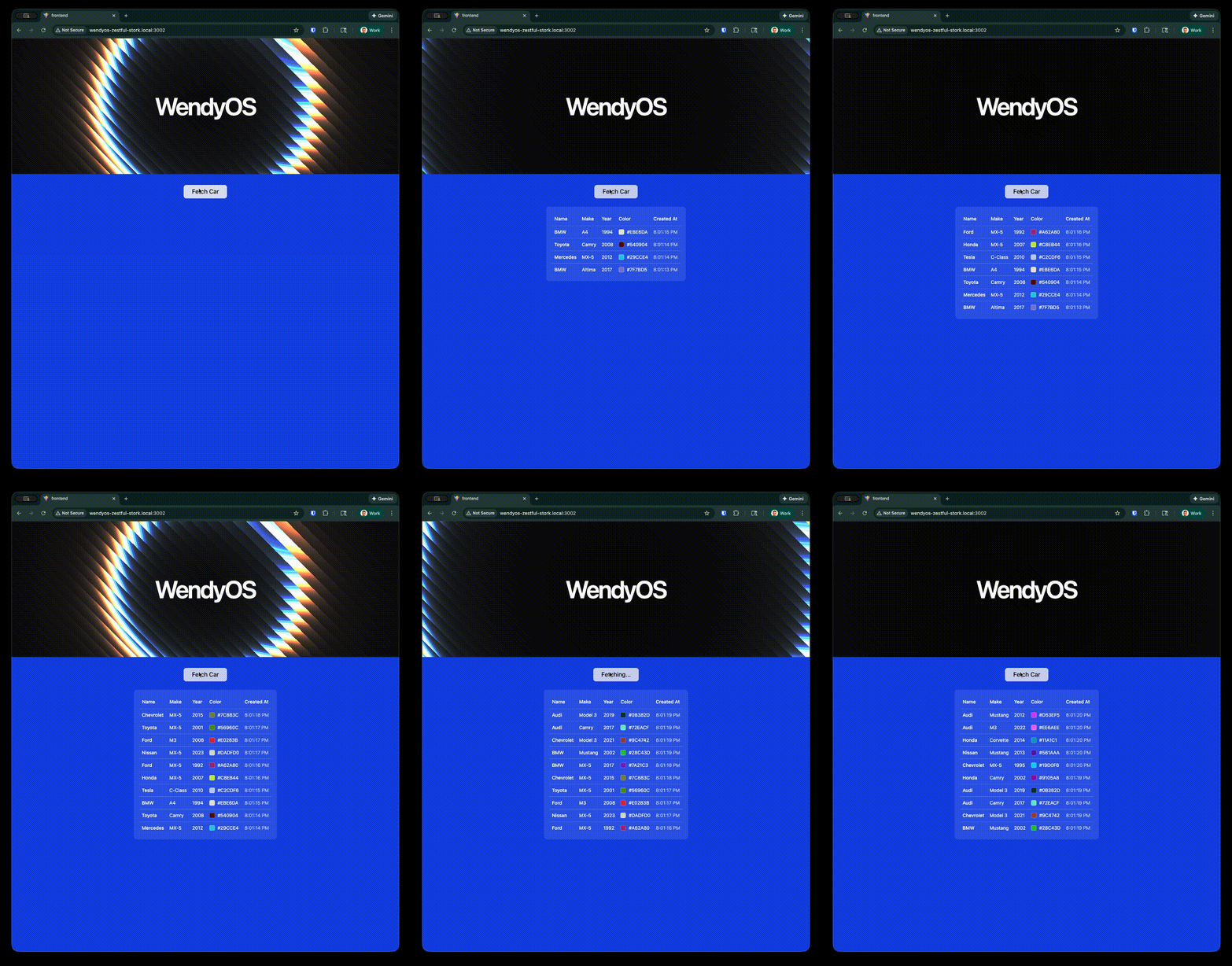
In this guide, we'll build a complete web application with a modern React frontend (using Vite, TypeScript, and shadcn/ui) and an Axum backend. The app displays an animated shader background with "WendyOS" text and includes an interactive feature to fetch and display random car data from an API.
This demonstrates how to:
- Serve a production-built React frontend from a Rust backend
- Create API endpoints that the frontend can consume
- Deploy the entire stack as a single container to your WendyOS device
Prerequisites
- Wendy CLI installed on your development machine
- Node.js 22+ and npm installed (for building the frontend)
- Rust 1.83 or later installed (via
rustup) - A WendyOS device plugged in over USB or connectable over Wi-Fi
Project Structure
web-app/
├── Dockerfile
├── wendy.json
├── frontend/           # Vite + React + TypeScript + shadcn/ui
│   ├── package.json
│   ├── src/
│   │   ├── App.tsx
│   │   └── components/
│   └── ...
└── server/             # Axum backend
    ├── Cargo.toml
    └── src/
        └── main.rs
Setting Up Your Project
Initialize the Project
Start from the Wendy full-stack Rust template:
wendy init web-app --target wendyos --language rust --template fullstack --var APP_ID=web-app --var PORT=8000 --assistant skip --git-init no
cd web-app
The template creates wendy.json, the Dockerfile, frontend files, and Rust backend files. The sections below explain how the generated full-stack app fits together.
Run on WendyOS
wendy runWendy will build the app, ask you to select a device if one is not already configured, deploy the app, and print the URL or run output.
Code Breakdown
Generated Frontend
The template includes a Vite React TypeScript frontend:
cd frontend
npm create vite@latest . -- --template react-ts
npm install
npm install -D tailwindcss @tailwindcss/vite
Initialize shadcn/ui:
npx shadcn@latest init --defaults
npx shadcn@latest add button table
Generated Frontend App
The generated src/App.tsx drives the browser UI:
import { useState } from "react";
import { Button } from "@/components/ui/button";
import {
  Table,
  TableBody,
  TableCell,
  TableHead,
  TableHeader,
  TableRow,
} from "@/components/ui/table";

interface Car {
  name: string;
  make: string;
  year: number;
  color: string;
  createdAt: string;
}

function App() {
  const [cars, setCars] = useState<Car[]>([]);
  const [loading, setLoading] = useState(false);

  const fetchCar = async () => {
    setLoading(true);
    try {
      const response = await fetch("/api/random-car");
      const car: Car = await response.json();
      setCars((prev) => [car, ...prev].slice(0, 10));
    } catch (error) {
      console.error("Failed to fetch car:", error);
    } finally {
      setLoading(false);
    }
  };

  return (
    <div className="flex min-h-screen w-full flex-col items-center bg-blue-700 p-8">
      <h1 className="text-7xl font-semibold text-white mb-8">WendyOS</h1>

      <Button
        onClick={fetchCar}
        disabled={loading}
        size="lg"
        variant="secondary"
      >
        {loading ? "Fetching..." : "Fetch Car"}
      </Button>

      {cars.length > 0 && (
        <div className="mt-8 w-full max-w-4xl rounded-lg bg-white/10 p-4">
          <Table>
            <TableHeader>
              <TableRow className="border-white/20">
                <TableHead className="text-white">Name</TableHead>
                <TableHead className="text-white">Make</TableHead>
                <TableHead className="text-white">Year</TableHead>
                <TableHead className="text-white">Color</TableHead>
              </TableRow>
            </TableHeader>
            <TableBody>
              {cars.map((car, index) => (
                <TableRow key={index} className="border-white/20">
                  <TableCell className="text-white">{car.name}</TableCell>
                  <TableCell className="text-white">{car.make}</TableCell>
                  <TableCell className="text-white">{car.year}</TableCell>
                  <TableCell className="text-white">
                    <div className="flex items-center gap-2">
                      <div
                        className="w-4 h-4 rounded"
                        style={{ backgroundColor: car.color }}
                      />
                      {car.color}
                    </div>
                  </TableCell>
                </TableRow>
              ))}
            </TableBody>
          </Table>
        </div>
      )}
    </div>
  );
}

export default App;
Build the frontend:
npm run build
cd ..
Generated Axum Backend
The generated server/Cargo.toml describes the backend:
[package]
name = "web-app-server"
version = "0.1.0"
edition = "2021"

[dependencies]
axum = "0.7"
tokio = { version = "1", features = ["full"] }
tower-http = { version = "0.6", features = ["fs", "cors"] }
serde = { version = "1", features = ["derive"] }
serde_json = "1"
rand = "0.8"
chrono = { version = "0.4", features = ["serde"] }
The generated server/src/main.rs handles the API:
use axum::{routing::get, Json, Router};
use chrono::Utc;
use rand::Rng;
use serde::Serialize;
use std::env;
use std::path::PathBuf;
use tower_http::services::{ServeDir, ServeFile};

#[derive(Serialize)]
#[serde(rename_all = "camelCase")]
struct Car {
    name: String,
    make: String,
    year: u32,
    color: String,
    created_at: String,
}

const CAR_NAMES: &[&str] = &["Honda", "Toyota", "Ford", "Chevrolet", "BMW", "Mercedes", "Audi", "Tesla", "Nissan", "Mazda"];
const CAR_MAKES: &[&str] = &["Civic", "Camry", "Mustang", "Corvette", "M3", "C-Class", "A4", "Model 3", "Altima", "MX-5"];

fn random_car() -> Car {
    let mut rng = rand::thread_rng();
    Car {
        name: CAR_NAMES[rng.gen_range(0..CAR_NAMES.len())].to_string(),
        make: CAR_MAKES[rng.gen_range(0..CAR_MAKES.len())].to_string(),
        year: rng.gen_range(1990..2025),
        color: format!("#{:02X}{:02X}{:02X}", rng.gen_range(0..=255), rng.gen_range(0..=255), rng.gen_range(0..=255)),
        created_at: Utc::now().to_rfc3339(),
    }
}

async fn get_random_car() -> Json<Car> {
    Json(random_car())
}

#[tokio::main]
async fn main() {
    let hostname = env::var("WENDY_HOSTNAME").unwrap_or_else(|_| "0.0.0.0".to_string());

    // Determine frontend dist path
    let frontend_dist = env::var("FRONTEND_DIST")
        .map(PathBuf::from)
        .ok()
        .or_else(|| {
            let container_path = PathBuf::from("/app/frontend/dist");
            if container_path.exists() { return Some(container_path); }
            let cwd_path = PathBuf::from("frontend/dist");
            if cwd_path.exists() { return Some(cwd_path); }
            None
        })
        .unwrap_or_else(|| PathBuf::from("/app/frontend/dist"));

    println!("Server running on http://{}:4002", hostname);
    println!("Serving frontend from: {:?}", frontend_dist);

    let index_file = frontend_dist.join("index.html");
    let serve_dir = ServeDir::new(&frontend_dist)
        .not_found_service(ServeFile::new(&index_file));

    let app = Router::new()
        .route("/api/random-car", get(get_random_car))
        .fallback_service(serve_dir);

    // Bind to 0.0.0.0 to accept connections from all interfaces (required for container networking)
    let listener = tokio::net::TcpListener::bind("0.0.0.0:4002").await.unwrap();
    axum::serve(listener, app).await.unwrap();
}
API Endpoint: The /api/random-car endpoint returns a randomly generated car object with name, make, year, color, and timestamp. The frontend fetches this data and displays the last 10 cars in a table.
Generated Dockerfile
The generated project includes a Dockerfile:
# Build frontend
FROM node:22-slim AS frontend-builder

WORKDIR /app/frontend
COPY frontend/package*.json ./
RUN npm ci
COPY frontend/ ./
RUN npm run build

# Build Rust server
FROM rust:1.83-slim AS rust-builder

WORKDIR /app
COPY server/Cargo.toml server/Cargo.lock* ./
COPY server/src ./src

RUN mkdir -p /app/../frontend/dist
RUN cargo build --release

# Runtime stage
FROM debian:bookworm-slim

RUN apt-get update && apt-get install -y --no-install-recommends \
    ca-certificates \
    && rm -rf /var/lib/apt/lists/*

WORKDIR /app

COPY --from=frontend-builder /app/frontend/dist ./frontend/dist
COPY --from=rust-builder /app/target/release/web-app-server /usr/local/bin/web-app-server

ENV FRONTEND_DIST=/app/frontend/dist

EXPOSE 4002

CMD ["web-app-server"]
Generated wendy.json
Review the generated wendy.json file:
{
  "appId": "com.example.rust-web-app",
  "version": "0.0.1",
  "entitlements": [
    { "type": "network" }
  ],
  "readiness": {
    "tcpSocket": { "port": 4002 },
    "timeoutSeconds": 30
  },
  "hooks": {
    "postStart": {
      "cli": "wendy utils open-browser http://${WENDY_HOSTNAME}:4002"
    }
  }
}
The readiness probe tells the CLI to wait until port 4002 is accepting connections before proceeding. The postStart hook automatically opens your browser once the app is ready.
Run Again on WendyOS
Deploy your full-stack web application to your WendyOS device:
wendy runTest Your Web App
Your browser will open automatically once the app is ready, thanks to the postStart hook. If it doesn't, navigate to:
http://wendyos-true-probe.local:4002Replace the hostname: Each WendyOS device has a unique hostname. Replace wendyos-true-probe with your device's actual hostname shown in the CLI output.
Test the API Directly
curl http://wendyos-true-probe.local:4002/api/random-carResponse:
{"name":"Toyota","make":"Camry","year":2015,"color":"#A4F2C1","createdAt":"2024-01-15T10:30:00.000Z"}Learn More
Next Steps
Now that you have a full-stack web app running:
- Add more API endpoints for CRUD operations
- Implement real-time updates with WebSockets
- Connect to WendyOS device sensors and display data in the UI
- Add authentication middleware
- Use a database for persistent storage